

People records
Every employee in one directory, with grid and table views, filters, bulk actions and CSV import. A searchable org chart shows who reports to whom.
From the punch at the door to the payslip on the phone. DueDoor HRMS keeps people records, attendance, leave, payroll and hiring together, with the payroll rules for India and the UAE built in.
Sixteen modules in the DueDoor dashboard, sharing one employee record, so a change in one place shows up everywhere it matters.
Every employee in one directory, with grid and table views, filters, bulk actions and CSV import. A searchable org chart shows who reports to whom.
Clock-ins from the attendance device, the employee app and the web, shifts with grace and half-day rules, a muster roll and regularisation requests.
Leave requests and approvals, balances, leave policies, a team calendar and the company holiday list.
Monthly runs that go from process to approve to pay, payslips with the tax working, and statutory exports for India and the UAE.
Expense claims with receipts that flow into the next payroll once approved, and salary loans or advances recovered as monthly instalments.
Jobs, a drag-and-drop candidate pipeline, interviews and offers, with a public careers page that takes applications.
Joiner checklists and a welcome kit, then exits with an exit interview, an offboarding checklist and the full and final settlement.
Review cycles, goals and OKRs with check-ins, review forms, 9-box calibration and one-to-ones.
A course catalogue, assignments and enrolment tracking, mandatory training by department and a skills matrix.
A kudos wall, announcements with acknowledgements, pulse and eNPS surveys, events and celebrations.
Employee tickets with SLA clocks, chat-style threads, internal notes and canned replies.
Laptops, phones and other company assets: who has what, assignment history and warranty dates.
Employee files with expiry and verification, company policies with acknowledgement, and letter templates with merge fields.
Headcount, attrition, attendance, leave, payroll cost and recruitment reports, each with a CSV download.
Built-in HR roles and custom roles, each set module by module, and checked on the server.
Ask questions in plain words about your company data, your policies and the statutory rules.
The face and fingerprint attendance device is part of DueDoor HRMS. Every punch becomes part of the day's attendance, and attendance sets the paid days in payroll.
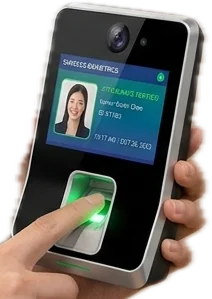
Punches from the attendance device, the employee app and the web land in the same day record, and each one shows where it came from.
Set shifts, a grace period for late marks, and the minutes that count as a half day or a full day. The same rules apply to every source.
Turn on location for app clock-in, and employees can clock in only inside the geofence you set for each office.
Employees ask to correct a day (forgot to punch, on duty, worked from home, device or system issue) and the request goes to approvals.
Unmarked working days with no leave can count as loss of pay, so the payroll run starts from the real paid days.
See the whole month at a glance and export it as CSV.
Each run goes from process to approve to pay. The maths happens on the server, every payslip shows its tax working, and the statutory files come out ready to upload.
Open a job, publish it on your own careers page and move candidates through the pipeline. When you hire, the candidate becomes an employee with the joiner checklist already started.
Merge fields fill in the name, role and pay. Preview, edit, print or save each letter to the employee file, one at a time or in bulk.
Each employee gets a private link that opens their self-service app in the phone browser, with nothing to install. They can also sign in to the employee dashboard on a laptop.
Managers get the same app plus a team view and approvals for the people who report to them.
Leave, attendance fixes, expenses and loans wait in one approvals inbox. Who can see and change what is set by role, and the server checks it on every request.
| Role | People | Payroll | Hiring | Settings |
|---|---|---|---|---|
| HR adminEverything, including payroll and settings | Manage | Manage | Manage | Manage |
| HR executiveDay-to-day HR, sees payroll but cannot run it | Manage | View | Manage | View |
| Payroll adminRuns payroll, expenses and loans | View | Manage | None | None |
| RecruiterHiring and onboarding only | View | None | Manage | None |
Managers and employees use the self-service side: managers see and approve for their own team, employees see only their own records. You can add custom roles and give people an HR-only login.
Employee records and the org chart, attendance and shifts, leave and holidays, payroll, expenses and salary loans, recruitment with a careers page, onboarding and exits, performance, learning, engagement, an HR helpdesk, assets, documents and letters, reports, access and roles, and an HR Copilot chat. It runs inside the DueDoor dashboard.
Yes. It works out PF with the wage ceiling you set, ESI, professional tax for the states that levy it, Labour Welfare Fund and TDS under both the old and the new regime, with a regime comparison for each employee. It exports the PF ECR file, ESI, PT and TDS reports, the bank transfer file and the payroll register.
Yes. UAE payroll carries no income tax lines, works out end-of-service gratuity under Federal Decree-Law 33 of 2021 and exports the WPS salary file (SIF) for payouts.
The face and fingerprint attendance device is part of the DueDoor HRMS. Its punches sit in the same attendance record as clock-ins from the employee app and the web, each marked with its source, and the same shift, grace and half-day rules apply to all of them. Attendance then sets the paid days and any loss of pay in payroll.
No. Each employee gets a private link that opens the self-service app in the phone browser, or they can sign in to the employee dashboard. From there they clock in, apply for leave, see balances, download payslips, raise expense claims, submit tax declarations and raise helpdesk tickets.
Access is set by role and checked on the server. An HR admin sees everything, an HR executive can view payroll but not run it, a payroll admin runs payroll, expenses and loans, and a recruiter sees hiring and onboarding only. Managers see their own team and employees see only their own records. You can add custom roles too.
Yes. The employee directory takes a CSV import, so you can bring your people in at once and then fill in salary structures, shifts and leave policies.
Book a call or message us on WhatsApp, and we will show you the HRMS and talk through your company, your locations and your payroll rules.
Book a call or message us on WhatsApp. We will show you attendance, leave and payroll working together and talk through your setup. You can also write to support@duedoor.com.